

A doula client resource list works best as a living, searchable page instead of a PDF. Keep your resources in one simple table, then display them as branded cards clients can filter by category on their phone. When a number or provider changes, you fix one row and every copy you shared updates itself, so the list stays current without a resend.
Note: some links in this post are affiliate links. If you sign up through one, I may earn a small commission at no extra cost to you. I only recommend tools I actually use.
Key Takeaways
- A PDF or Google Doc resource list goes out of date within months as links die and numbers change, and clients rarely scroll it when they need help fast.
- A doula client resource list should be parent-facing and sorted by category, covering mental health, lactation, providers, childbirth education, parental support, and safety resources.
- Start with stable national resources like Postpartum Support International and the National Maternal Mental Health Hotline, then add local providers you have personally vetted.
- Keeping resources in one table connected to a display tool means you update a single row and every shared copy changes with it.
- Share the link at the prenatal visit and it keeps supporting families through postpartum, when you are no longer in the room.
Why does a PDF resource list stop working?
Most doulas build a resource list by collecting referrals for years, then dumping them into a Google Doc or PDF attached to a welcome email. Two things go wrong. Phone numbers change and links die, so part of the list is wrong within a few months and you never notice until a client tells you. And a family at 2 a.m. with a feeding problem is not going to scroll a four-page PDF to find the lactation number.
A resource list is a client-facing deliverable. It should be as easy to use as everything else you do. That means the right resource, sorted by need, on their phone, and current.
What belongs on a doula client resource list?
Think parent-facing: places you would actually send a client, sorted by category so someone can find one thing fast. A strong list covers mental health, lactation, providers, childbirth education, parental support, intimate partner violence, addiction, welfare, comfort techniques, and how to find another doula.
Start with reliable national resources that are not going to disappear:
- Postpartum Support International (PSI) at postpartum.net
- National Maternal Mental Health Hotline, 1-833-852-6262, call or text
- 988 Suicide and Crisis Lifeline, call or text 988
- National Domestic Violence Hotline, 1-800-799-7233
- La Leche League International for lactation support
- MotherToBaby, 1-866-626-6847, for questions about medications during pregnancy and lactation
- 211 for local help with food, housing, utilities, and childcare
- DONA International and MeetYourDoula.com to find a doula for backup or referral
- National Black Doulas Association, which connects Black and BIPOC families with Black and BIPOC doulas
Many of these offer support in Spanish and other languages. Note that on your list, because it matters to the families who need it most. Then add the local people you have vetted: the International Board Certified Lactation Consultant (IBCLC) who does home visits, the perinatal therapist taking new clients, the birth center, the pediatric group you trust. Local is where you add the most value, because anyone can find a national hotline on their own.
How do I build a resource list that updates itself?
The fix for the stale-PDF problem is to keep your resources in one place and show them as a living page instead of a file. I keep mine in an Airtable table with a column for the name, website, phone, category, location (local or virtual), a status (active, paused, or retired), and a notes line for context like "sliding scale" or "Spanish available." That is the whole database.
Then I connect that table to BlockBuilder, which turns the rows into a branded page of cards with a search bar and a filter by category. A client taps Lactation or Mental Health and sees only those. The steps are short:
- Make the table with the columns above.
- Connect BlockBuilder to the table.
- Map the name, notes, phone, and website onto the card.
- Turn on the search bar and the category filter.
- Style it to match your brand.
- Grab the share link or the embed code.
Here is the part that changes everything. When a number changes or a provider stops taking clients, you fix one row, and every place you shared that link updates itself. No new PDF. No resend email. You can mark a resource Paused instead of deleting it, so it comes back when they reopen.
I built the example list in BlockBuilder, which is the tool I use for this. If you want to see how it turns a plain list into a searchable page, you can watch my free demo.
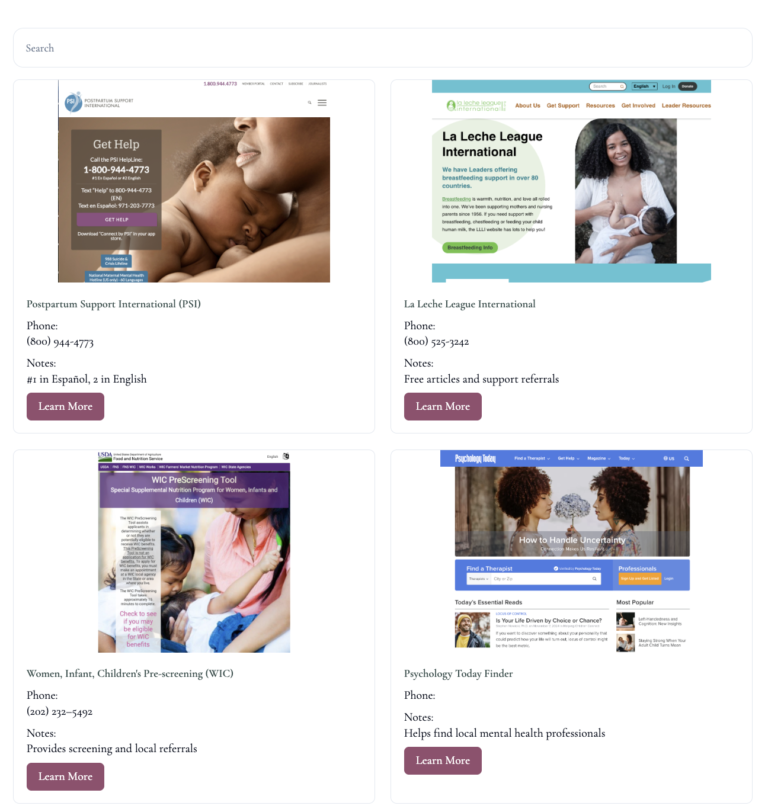
Here is that example list as a live block. The same data can display more than one way, so here it is in two layouts. Use the search, or tap a category to filter either one.
As a searchable list
As a card grid
How do I get clients to actually use the list?
A resource list only helps if clients know it exists and can find it when they need it. Share the link at your prenatal visit, not buried in a contract they signed once. Walk through it together so they see how the search works.
Then point to it by name when something comes up. When a client mentions feeding worries, you say, "open the resource list, filter Lactation, the IBCLC at the top does home visits." The link carries into postpartum, which is when families need referrals most and you are not in the room. That is the list doing your work for you.
Keep it current in about five minutes a month. When you meet a provider you would trust with your own client, add a row. When one closes or moves, retire it. A short list you stand behind beats a giant unfiltered one every time.
How do I make the list my own?
Brand the page, add one line at the top that says what it is, and keep it to resources you would personally recommend. Your clients are not looking for every option on the internet. They are looking for the few you would send your own family to.
A resource list that stays current is one of the easiest ways to look like the organized professional you already are, and to keep supporting families after you leave. If you want to build one without touching code, watch my free BlockBuilder demo. It walks through connecting your data, building the block, embedding it on your site or even inside an email, and watching it update live when you change a row.
Frequently Asked Questions
Do I need to know how to code to build a searchable resource list?
No. Tools like BlockBuilder read a table you already keep and turn it into a searchable page of cards, so you point and click rather than write code. You can watch the whole process in a free demo before you build your own.
How often should I update my client resource list?
Plan on about five minutes a month, plus a quick edit whenever you meet a new provider or one closes. Because a living list updates from one table, a single change reaches every client you shared the link with, so small, regular updates keep the whole thing accurate.
Should my resource list be local or national?
Both. National resources like the National Maternal Mental Health Hotline and Postpartum Support International are stable and reachable from anywhere, so they make a reliable base. Your vetted local providers are where you add the most value, since families cannot easily find or judge those on their own.
Is it a scope problem for a doula to give clients a resource list?
Sharing vetted contact information and directories is within a doula's scope, because you are connecting families to qualified professionals rather than diagnosing or treating. Keep your notes factual, avoid medical advice, and let each resource speak for its own services.
What should I include for families who speak languages other than English?
Note language availability directly on each resource. Several national lines, including the National Maternal Mental Health Hotline and the National Domestic Violence Hotline, offer support in Spanish and many other languages, and flagging that helps the families who need it most.
Can I use one resource list for every client, or should I personalize it?
One well-organized master list works for most clients because they can search and filter to what they need. When a client has a specific situation, you can point them to the exact category or add a temporary local resource, without rebuilding the whole list.